An image or video on this page did not load. Reload the page; if it is still missing, a file may not have published yet.
Product Updates

Product Updates ·

Show a directory inside a WordPress website, Member Leads rebuilt with a map of matches, and failed webhooks now visible in the Activity Tracker

Everything that reached Brilliant Directories websites this week, grouped by area of the software, followed by the default widgets and post type templates that changed.

1 new 10 improved 24 fixed 12 widgets updated

The new admin look

Member Leads, Post Comments and Private Member Chats moved to the new admin design, each with a side drawer, and Member Leads gains a Map tab.

Improved

Member Leads map tab, distances and hover cards, plus a resizable drawer

The Member Leads page now has a Map tab that shows a lead and its matches by distance, richer hover cards in the lead list, a drawer that can be dragged wider, and members with placeholder emails are no longer suggested for leads.

Where: Interactions > Member Leads

Widget: Search - Member - Search Query (ID 1560)

Learn more: Interactions › Member Leads

Open a lead, check its matches, then use the new Map tab and hover a pin for the distance.
Improved

Redesigned Member Leads page with Match Leads and Lead Settings built in

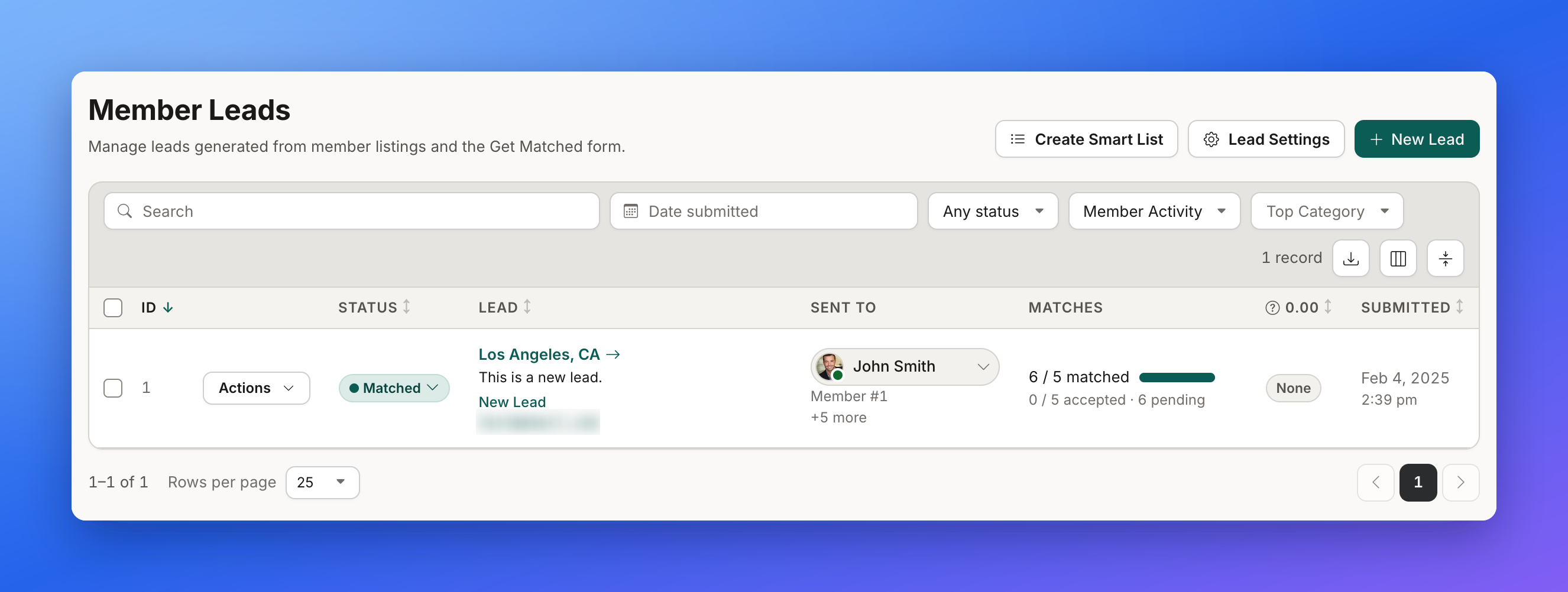
The Member Leads page in the admin has a new look with better search and filters, a lead drawer for details, matches and finding members, and Lead Settings opening on the same page.

Where: Interactions > Member Leads

Widget: System - SaveForm (ID 1382)

Learn more: Lead Settings › Receiving Indirect Leads (Automatic Lead Matching) · Auto-Match Workflows › Additional Notifications Settings · Default Lead Action & Creating New Lead Actions

Member Leads admin page with search and filter bar and one matched lead in the list
The redesigned Member Leads page, with search, filters, Lead Settings and New Lead at the top.
Improved

Redesigned Post Comments admin page

The Post Comments page in the admin has a new look with filters and search, a comment drawer showing the whole thread, simple editing and status changes, and Comment Settings on the same page.

Where: Interactions > Post Comments

Learn more: Community Comments

Filter the comments by status, then open a comment to see its whole thread in the drawer.
Improved

Redesigned Private Member Chats admin page

The Private Chats page in the admin has a new look with filters, search, a chat drawer showing the full conversation, and quick status changes and deletes.

Where: Interactions > Private Chats

Learn more: Private Member Chat

Each chat is Active, Closed or Reported. Open a chat to read the full conversation in the drawer.

Front End & Design

Faster member search and search sidebar on very large directories, express registration that finishes, and a Community Comments label fix.

Improved

Faster member location search on very large directories

Member searches by location, and the Find Matches list on leads, are now much faster on directories with hundreds of thousands of members, and return the same results as before.

Where: Public member search results page and the Find Matches tab of a lead in the admin (Interactions > Member Leads).

Widget: Search - Member - Search Query

Improved

Faster search sidebar on websites with very large member lists

The Dynamic Filtering search sidebar now loads much faster on websites with very large member lists when categories with no members are hidden, and it shows exactly the same categories.

Where: Public search results page (Dynamic Filtering sidebar)

Fixed

  • Community Comments sort option now reads "Most Replies". The Community Comments sort menu now shows "Most Replies" with proper capitalization, and a customized label for it appears exactly as typed. Learn more: Community Comments
  • Express registration no longer hangs on 'Processing Request...'. Fixed express member registration so the sign-up window finishes and shows the result instead of staying on 'Processing Request...'.

Settings

Domain Manager can connect a WordPress website and names the SPF lines that can go, Advanced Settings loads on big sites, and removing a package no longer strips SSL.

New

Show a directory inside a WordPress website

Domain Manager now has a My WordPress website option that issues a license key for the BD Reverse Proxy WordPress plugin, so a directory can appear at an address like example.com/directory inside the site owner's WordPress site.

Where: Admin > Settings > Domain Manager > Change Domain > My WordPress website (/admin/domainManager.php?action=change_domain)

Learn more: Settings › Domain Manager › Connect a WordPress Website · Settings › Domain Manager · How to Connect a Domain to a Brilliant Directories Website · Can I host a Wordpress site on Brilliant Directories?

Choose My WordPress website, enter the WordPress address and folder, and get a license key for the plugin.

Fixed

  • Advanced Settings no longer shows a blank page on sites with many web pages. Fixed the Advanced Settings page appearing empty on sites that have a very large number of web pages.
  • Domain Manager now names the SPF lines that can be removed. On the Domain Manager Emails tab, the SPF check now says exactly which lines are optional to remove, and flags a bare +a on domains that run through Cloudflare's proxy. Learn more: Settings › Domain Manager › Emails and Sender Authentication
  • Mailbox setup browser link no longer shows a certificate warning. Fixed the browser webmail link in Domain Manager's mailbox setup instructions so it opens over a trusted connection.
  • Removing SSL now leaves a backup self-signed certificate in place. After SSL is removed from a site, the platform now installs its basic backup certificate correctly, so the domain no longer ends up with no HTTPS setup.
  • Removing one add-on package no longer removes SSL that another package still includes. When two active packages both include SSL, removing one of them no longer deletes the site's certificate or turns https off.

Toolbox

Sitemap rebuilds finish with NoIndex page types and leave out empty post type pages, Form Manager screens no longer open blank, and exports keep plus signs.

Improved

Sitemap now leaves out empty post type pages

The sitemap no longer lists post type pages (and the Member Reviews page) that have nothing to show, so search engines are not sent to empty pages.

Where: Toolbox, Sitemap Generator (after the next rebuild)

Learn more: Google Sitemap Generator

Fixed

  • Business Data import no longer leaves members without a token. Members created by a Business Data import now always keep their account token, so their login and claim-listing links work.
  • Exports keep plus signs. CSV exports from the admin now keep plus signs in values such as phone numbers and email addresses instead of turning them into spaces.
  • Form Builder preview no longer stays blank on large forms. The Form Preview panel in the Form Builder now always shows, including on large forms where it used to stay blank.
  • New Form popup no longer opens blank. The New Form popup in Form Manager now always shows its title, fields and Save button, even on sites that had deleted form fields, and deleting a form field now also removes its leftover settings.
    New Form opens its popup with a title, the two fields and Save and Continue.
  • Sitemap Generator no longer stops when rebuilding with NoIndex page types. Rebuild Sitemap now finishes when some page types are set to NoIndex, and removes those page types from the live sitemap instead of stopping with a 'Sitemap Not Finished' error.

Developer Hub

The Activity Tracker shows whether a webhook was accepted, plus fixes for sub-accounts and category descriptions through the API, Enhanced Hosting robots.txt rules and the API request log.

Improved

Activity Tracker now shows whether a webhook was accepted

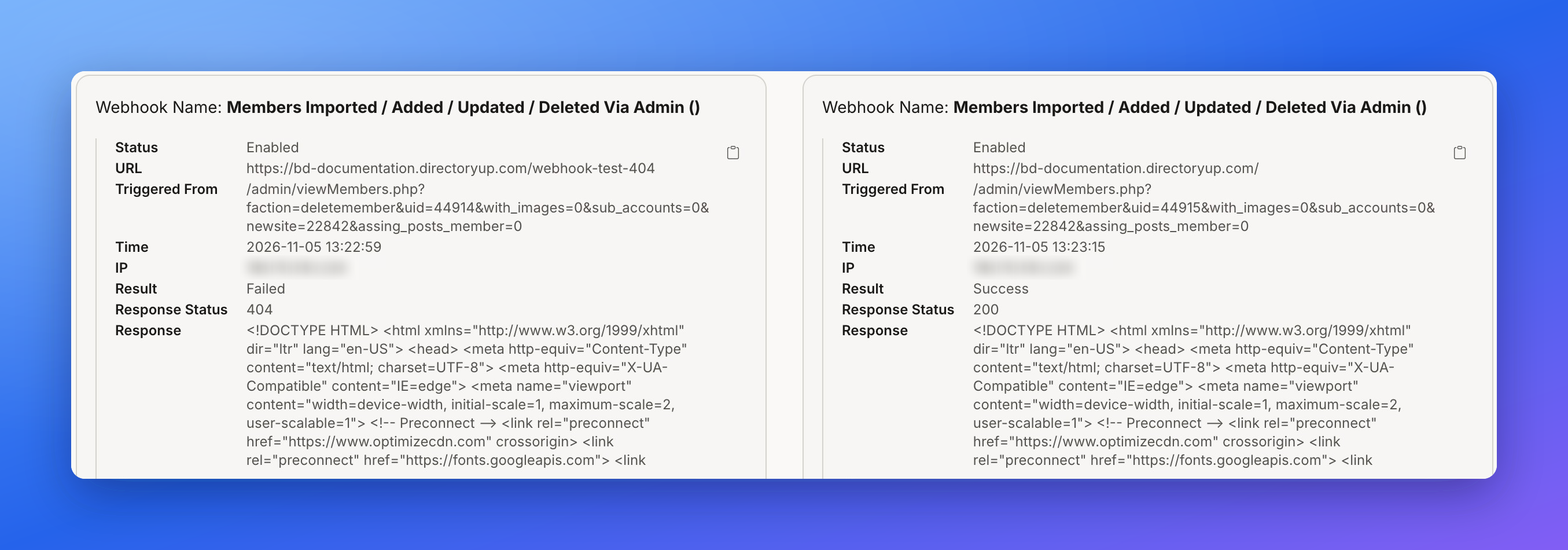
The Activity Tracker's Webhook Sent entries now show the receiving server's response status and a short excerpt of its reply, and are marked Failed when the receiver rejects the webhook or does not answer.

Where: Admin > Activity Tracker (Webhook Sent entries)

Learn more: Developer Hub - Webhooks

Two Activity Tracker webhook entries side by side, one marked Failed with response status 404 and one marked Success with response status 200
A Webhook Sent entry now shows the result: Failed with a 404 on the left, Success with a 200 on the right, plus the start of the receiver's reply.

Fixed

  • API request log now removes entries older than 60 days. Fixed the API request log so that entries older than 60 days are now removed automatically.
  • API updates no longer detach sub-accounts from their parent. Updating a sub-account through the API now leaves its parent link, email, login and password alone unless they are sent in the update, and creating a sub-account returns the new sub-account's own ID.
  • Category descriptions now save when updated through the API. Updating a category or sub-category through the API now saves its description; before, the call reported success but kept the old description.
  • Enhanced Hosting now adds its AI crawler rules even if robots.txt already names OAI-SearchBot. Fixed Enhanced Hosting so its AI crawler rules are added to robots.txt even when the file already contains an OpenAI search bot entry the site added itself.

My Content

Post save messages say whether a post was published, saved as a draft or sent for approval, and removed files no longer leave dead links.

Improved

Post save messages now say published, draft or pending approval

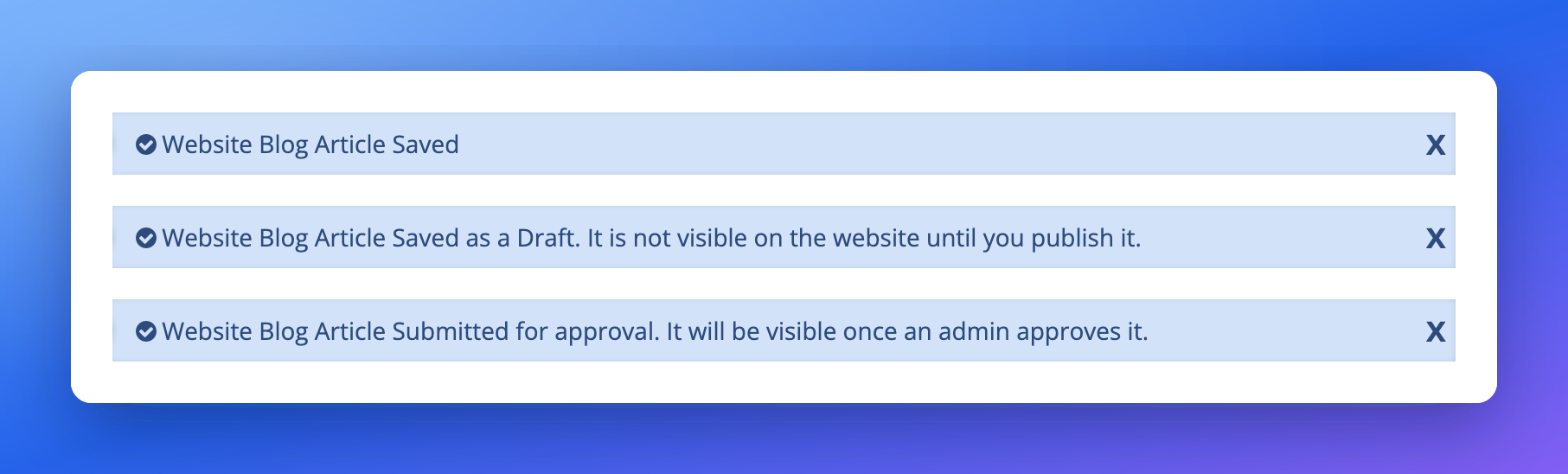
After a member saves a post, the confirmation now says whether the post was published, saved as a draft, or sent for admin approval, and the wording can be edited in Settings > Text Labels.

Where: Member dashboard add/edit post forms; Settings > Text Labels (feature_saved_draft_alert, feature_saved_pending_alert, changes_save_draft, changes_save_pending)

Widget: Bootstrap Theme - Account - Feature Edit

Three confirmation bars reading Website Blog Article Saved, Saved as a Draft, and Submitted for approval
The three save messages: published, saved as a draft, and submitted for approval.

Fixed

  • Removing an uploaded file now also removes its saved link. When a file is removed from a File field on a post or member profile, the saved link to that file is now removed too instead of staying behind as a dead link.

Big tables stay fast

Several admin pages and exports load much faster on websites with very large amounts of data.

Improved

Admin pages stay fast on websites with very large tables, round 2

The broken redirects list, Activity Tracker, Widget Manager, Text Labels, Reviews export and Autosuggest Settings now load much faster on websites with very large amounts of data, and Advanced Settings uses a searchable page list on sites with more than 500 pages.

Where: Developer Hub > 301 Redirects, Activity Tracker, Toolbox > Widget Manager, Settings > Advanced Settings, Settings > Text Labels, Autosuggest Settings

Widget: Autosuggest Settings (ID 1145)

Finance

Stop This Payment reports failures honestly, no-card free trials hide billing fields, and Razorpay signups finish after payment.

Fixed

  • No-card free trials hide billing fields on custom signup forms. A membership plan with a free trial that needs no credit card now hides the billing section and the Name on Card field at checkout, even when the plan uses its own copy of the signup form.
  • Paid signups through Razorpay now finish after payment. Fixed a problem where a paid signup paid through Razorpay could stay stuck on the secure payment page transfer message after the payment went through.
  • Stop This Payment no longer reports success when it did not work. Stop This Payment on Finance > Transaction History now checks that the invoice is still unpaid and shows the billing system's error if the change fails, instead of always saying the invoice was cancelled. Widget: Website-Billing2-Functions (ID 1816)

My Members

Service Areas no longer saves blank cities, and sign-up no longer breaks a site's own secure web requests.

Fixed

  • Service Areas no longer saves blank cities, and the X icon clears location boxes. Adding a city on the member Service Areas page now saves it with its name and location, shows an error instead of a blank row when no match is found, and the X icon in location boxes clears the text again. Widgets: Bootstrap Theme - Account - Select Locations (ID 1786), Bootstrap Theme - Footer - Scripts - Input Clear Content Scripts (ID 2533)
    A city with no match now shows an error instead of saving a blank row, and the X icon clears the box.
  • Sign-up no longer breaks a site's own HTTPS calls with a certificate error. Fixed a certificate error (cURL error 77) that could appear on member sign-up when a site's own code, such as a conversion tracking widget, made a secure web request.

Dashboard Overview

The Activity Tracker records admin invite accepts and role changes.

Fixed

  • Activity Tracker now logs admin invite accepts and role changes. The Activity Tracker now records when an invited admin accepts, with the inviter and role named, and when an admin's role is changed, and the accept no longer shows an error.

Platform & Servers

Legitimate file writes, such as a custom mail script's, are no longer discarded by the file-write protection.

Fixed

  • Outgoing email and log writes no longer dropped by the security layer. Fixed a problem where the platform's file-write protection wrongly discarded some legitimate writes, such as the greeting line a custom mail script sends to an email server, which could stop outgoing email from custom code.

Widgets and templates updated

These default widgets and post type templates changed this week. A website that has customized one of them keeps its own version and does not receive the update. To pick up the change, copy it into the customized version, or remove the customization to go back to the updated default.

Learn more: How To Customize a Widget

Default widgets

WidgetWhat changed
Autosuggest Settings (ID 1145)Rule updated dates are read in one indexed lookup instead of one join per rule.
Bootstrap Theme - Account - Feature EditSuccess message after saving now depends on the saved post status (published, draft or pending approval) and falls back to the old message if the new labels are missing.
Bootstrap Theme - Account - Select Locations (ID 1786)Cities are searched city-first, no row is saved when nothing matches, and the server rejects a service area without an address or place id.
Bootstrap Theme - Footer - Scripts - Input Clear Content Scripts (ID 2533)The X icon releases the location suggest lock so the input actually clears.
Bootstrap Theme - Form - Froala Editor ActionsUpload, browse and delete now require an admin or member login, are limited to the caller's own folder, and reject files that are not really images.
Bootstrap Theme - Member Login Page (1349)Login now only accepts the member login form.
Search - Member - Search QueryLocation searches first narrow to members the location can reach, then apply the original filters; a follow-up fix keeps that step out of later query edits and escapes state and country names once.
Search - Member - Search Query (ID 1560)Members with placeholder emails are left out of Find Matches suggestions.
System - Froala Upload Read ImagesLists the images folder only for an admin session or a signed admin image-manager token; everyone else gets an empty list.
System - SaveForm (ID 1382)After an automatic match the lead is set to Matched, Accepted or Sold Out according to the match rules.
Website-Billing2-Functions (ID 1816)The stop payment action re-reads the invoice, only cancels Unpaid or Overdue invoices, reports a billing error when the update fails, and sends the cancel invoice webhook only after success.
browse-images-froala-customAdmin session only, and returns web addresses instead of server file paths.